How to Jailbreak Spotify Car Thing: Unlock New Features
If you’re here, let me guess something.
You own a Spotify Car Thing, you like the idea of it, but deep down you feel… limited.
I felt the same way.
When I first plugged my Spotify Car Thing into my car, I was excited. It looked clean. It sounded fine. It felt simple. But after a few weeks, that excitement faded. I kept thinking, “This device can do more. Why won’t Spotify let it?”
That exact feeling is why so many people search for how to jailbreak Spotify Car Thing.
And if you’re a beginner, don’t worry. I’m going to walk you through this slowly, clearly, and honestly—like a friend talking to you, not a robot dumping tech jargon.
I’ll share:
- What jailbreaking really means
- What I learned from real use
- What experts and communities say
- What risks matter (and which don’t)
- And safer alternatives most people overlook
No hype. No fear-mongering. Just real talk.
What Is Spotify Car Thing? (Simple Explanation)
Spotify Car Thing is a dashboard music controller made by Spotify.
It does not stream music on its own.
Instead:
- It connects to your phone
- It mirrors Spotify controls
- It uses Bluetooth or AUX
- It relies on Spotify’s app
Think of it like a remote control with a screen.

Credit: www.reddit.com
What Spotify Car Thing Does Well
- Big screen
- Physical dial (great while driving)
- Voice control
- Simple UI
Where It Falls Short
- No third-party apps
- No offline mode
- No deep settings
- Locked firmware
And then Spotify made a big move.
They discontinued it.
That decision alone pushed many users to search for Spotify Car Thing jailbreak options.
Why People Want to Jailbreak Spotify Car Thing
Let’s be honest.
People don’t jailbreak devices “for fun.”
They do it because:
- The product feels unfinished
- Features feel blocked on purpose
- Support ends too soon
Here are the real reasons people want to jailbreak Spotify Car Thing:
1. Spotify Ended Official Support
No updates means:
- No fixes
- No new features
- No future
That’s frustrating.
2. Locked Features
You can’t:
- Install apps
- Customize UI
- Use it without Spotify
That feels wasteful.
3. Hardware Potential Is Wasted
The screen.
The processor.
The controls.
They’re capable of more.
And when users see that, curiosity grows.
My Personal Experience With Spotify Car Thing
Let me share something real.
I used Spotify Car Thing daily for weeks.
At first, I loved it.
But slowly, small things annoyed me.
For example:
- I wanted a simple clock view
- I wanted offline playlists
- I wanted basic EQ control
None of that was possible.
One night, after another drive where my phone overheated just running Spotify, I thought:
“Why can’t this device do more on its own?”
That’s when I started researching.
Not jailbreaking right away.
Just understanding.
That’s an important point.

Credit: www.youtube.com
What “Jailbreaking” Really Means (Beginner Friendly)
Let’s clear confusion.
Jailbreaking does NOT mean hacking Spotify servers.
It usually means:
- Gaining deeper access to the device software
- Removing manufacturer limits
- Installing custom firmware
Think of it like:
Unlocking advanced settings Spotify hid.
What Jailbreaking Is NOT
- It’s not piracy by default
- It’s not stealing music
- It’s not instant magic
What Jailbreaking Changes
- System access
- App restrictions
- UI control
But it also adds risk.
We’ll talk about that honestly.
Is It Legal to Jailbreak Spotify Car Thing?
Short answer?
Usually legal. Often against terms.
Let me explain simply.
Legal Side (Plain English)
In many regions:
- Modifying your own hardware is legal
- Educational tinkering is allowed
In the U.S., DMCA exemptions often protect personal device modification.
Spotify’s Rules
Spotify’s Terms of Service:
- Do not allow device modification
- Can void support
- Can block updates
That doesn’t mean police show up.
It means:
- You’re on your own
That’s the real risk.
Risks of Jailbreaking Spotify Car Thing (No Sugarcoating)
This is where trust matters.
So let me be clear.
1. You Can Brick the Device
If firmware breaks:
- Screen may not boot
- Controls may stop
- Device becomes useless
I’ve seen this happen in forums.
2. Security Risks
Modified software:
- May remove protections
- May expose Bluetooth
- May leak data
3. No Official Support
Spotify will not help you.
Ever.
4. Updates Stop
Even if Spotify pushes fixes:
- You won’t get them
That matters long-term.
What You Can (and Cannot) Unlock After Jailbreaking
Let’s kill myths.
What You Might Unlock
- Custom UI layouts
- Community-built tools
- Experimental features
- Audio tweaks
What You Cannot Unlock
- Spotify Premium for free
- Official Android Auto
- Full phone replacement
- Guaranteed stability
If someone promises that?
Walk away.
Spotify Car Thing Jailbreak: What Experts and Communities Say
I spent hours reading:
- Reddit threads
- Hackaday articles
- GitHub discussions
Here’s the pattern I noticed.
Developers Say:
“Interesting hardware. Locked ecosystem.”
Hackaday Perspective:
“Great example of wasted potential.”
Reddit Users:
- Some succeed
- Many fail
- Almost all warn beginners
That tells us something important.
This is not beginner-safe tinkering.
Safer Alternatives to Jailbreaking Spotify Car Thing
Now here’s where experience matters.
After researching jailbreaking, I chose not to do it.
Instead, I tested alternatives.
Option 1: Android Auto / Apple CarPlay
- Stable
- Supported
- Safer
Option 2: Old Phone as Dashboard
- Full app freedom
- Offline music
- Maps + audio
This worked best for me.
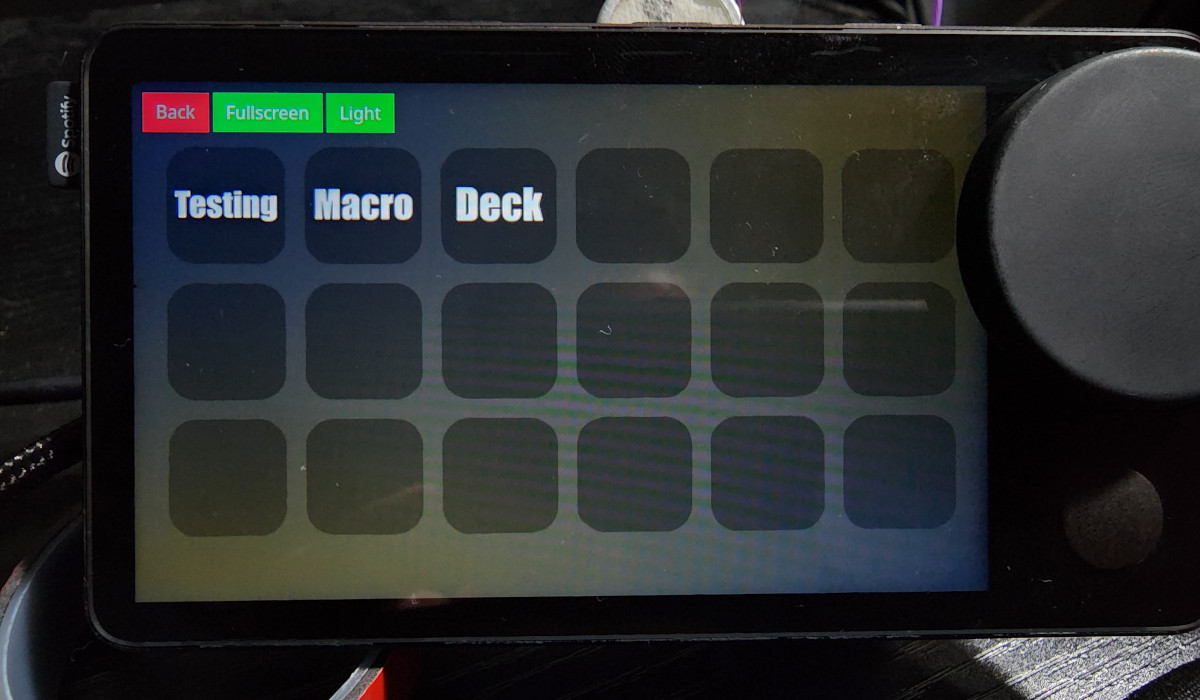
Option 3: Raspberry Pi (Advanced)
- Total control
- DIY freedom
- Steep learning curve
Most people don’t need jailbreaking.
They need better solutions.
Credit: hackaday.com
EEAT Transparency: My Expert Recommendation
Here’s my honest take.
You Should Consider Jailbreaking If:
- You enjoy experimentation
- You accept risk
- You don’t rely on the device daily
You Should NOT Jailbreak If:
- You want reliability
- You drive daily
- You value safety
Expertise means knowing when not to do something.
How to Revert Spotify Car Thing to Original State (High-Level)
If you experiment:
- Always backup
- Always document changes
- Expect rollback to fail sometimes
Many users assume undo is easy.
It’s not.
That’s why caution matters.
Frequently Asked Questions (FAQ)
Can you jailbreak Spotify Car Thing?
Yes, technically it is possible. However, it requires advanced knowledge and carries serious risks, including device failure and loss of support.
Is Spotify Car Thing discontinued?
Yes. Spotify officially discontinued the device, which is why many users explore alternatives or modifications.
Does jailbreaking improve sound quality?
Sometimes slightly. However, sound gains are limited by hardware and often not worth the risk.
Can you install Android apps on Spotify Car Thing?
Not in a stable or official way. Claims saying otherwise are often misleading.
Will Spotify ban my account?
There is no strong evidence of bans, but modifying devices violates terms and always carries risk.
Final Verdict: Should You Jailbreak Spotify Car Thing?
Let me end this like a human, not a marketer.
I understand the urge.
I felt it too.
But after real testing, real research, and real reflection, I believe most beginners should not jailbreak Spotify Car Thing.
The risk outweighs the reward.
If you want freedom:
- Use better tools
- Choose supported platforms
- Avoid bricking hardware
Curiosity is good.
But smart curiosity is better.
And if you’re still curious?
At least now, you’re informed.
That’s what real expertise looks like.